Vedantu is India’s one of the largest live learning platforms. Whatever we build creates a tremendous impact on students. To deliver this impact, we consistently improve our services.
Due to the surge in scale and the number of live sessions increasing on our platform we realised it’s time to revisit the services used by the team. Our team is responsible for ins and outs of WAVE (the platform that powers our live class). We are using AWS primarily to power our infrastructure. So we picked up the task to reduce the AWS bill.
EC2
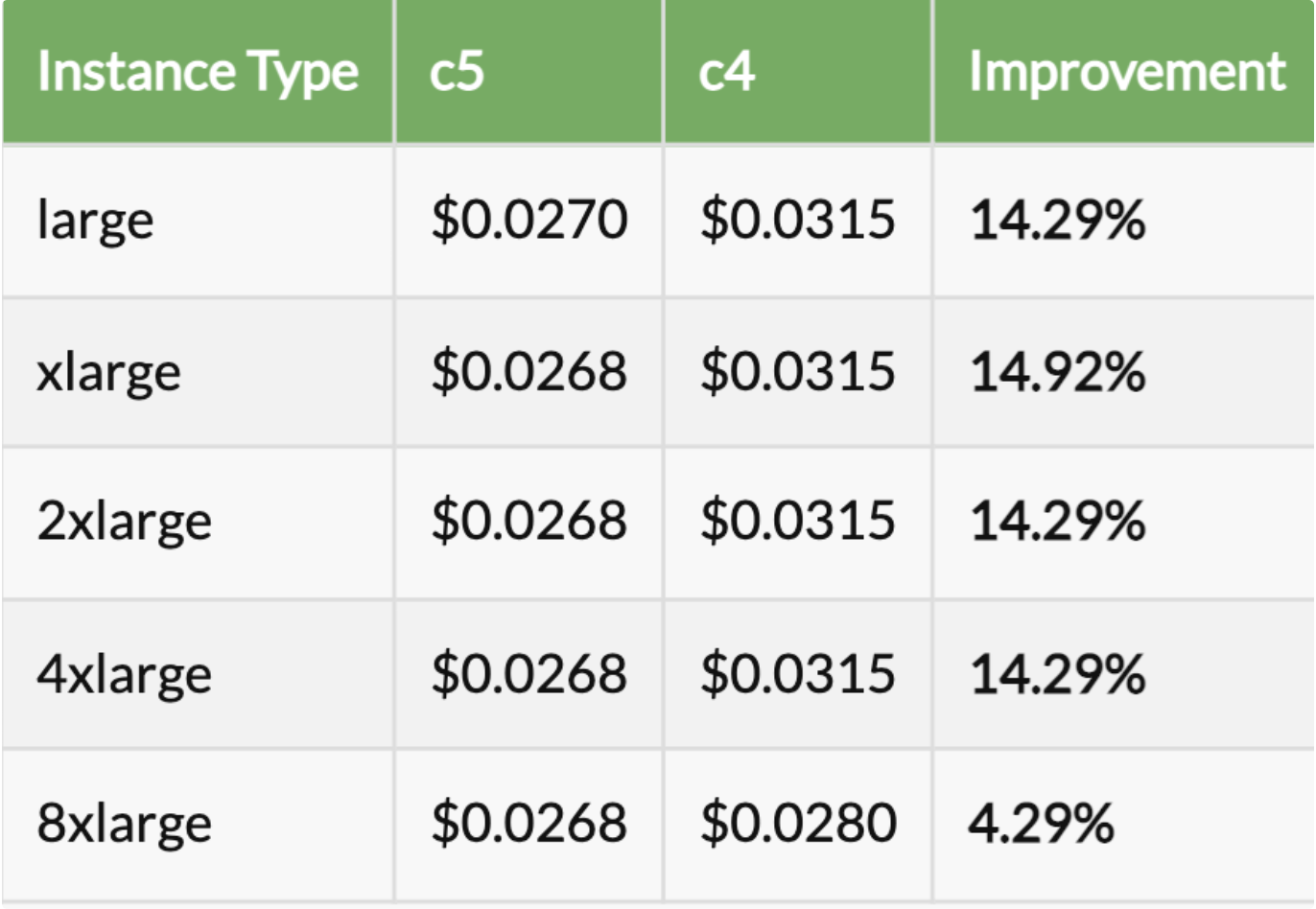
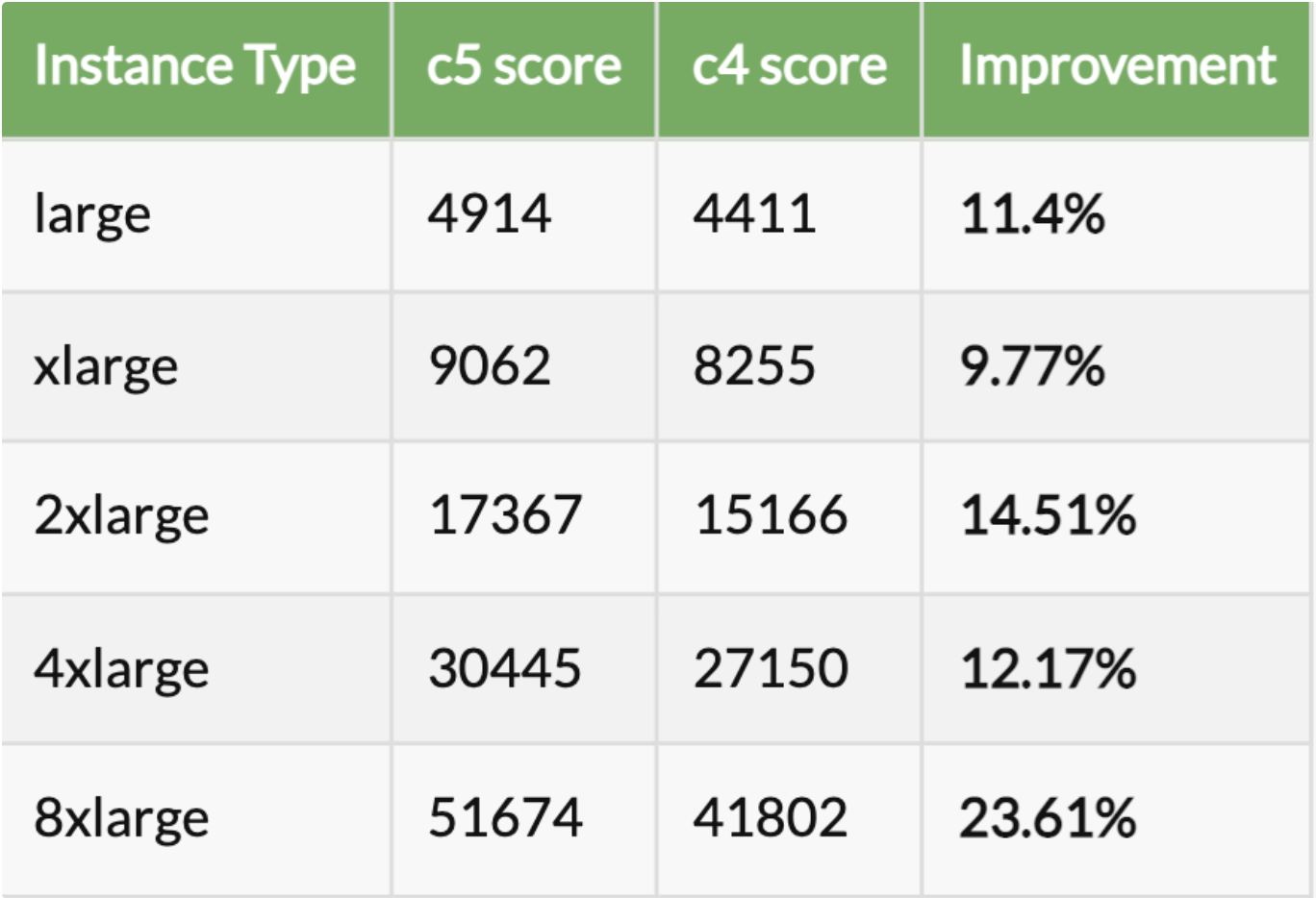
- We launch a lot of instances daily for video conversion and compression. Earlier we were using older generation instances. Then we upgraded those instances to the latest generation. On comparing c4 with c5 we realised the newer generation instances are 4 to 15% cheaper and 11 to 24% faster than older generation instances
Price Comparison
Performance Comparison
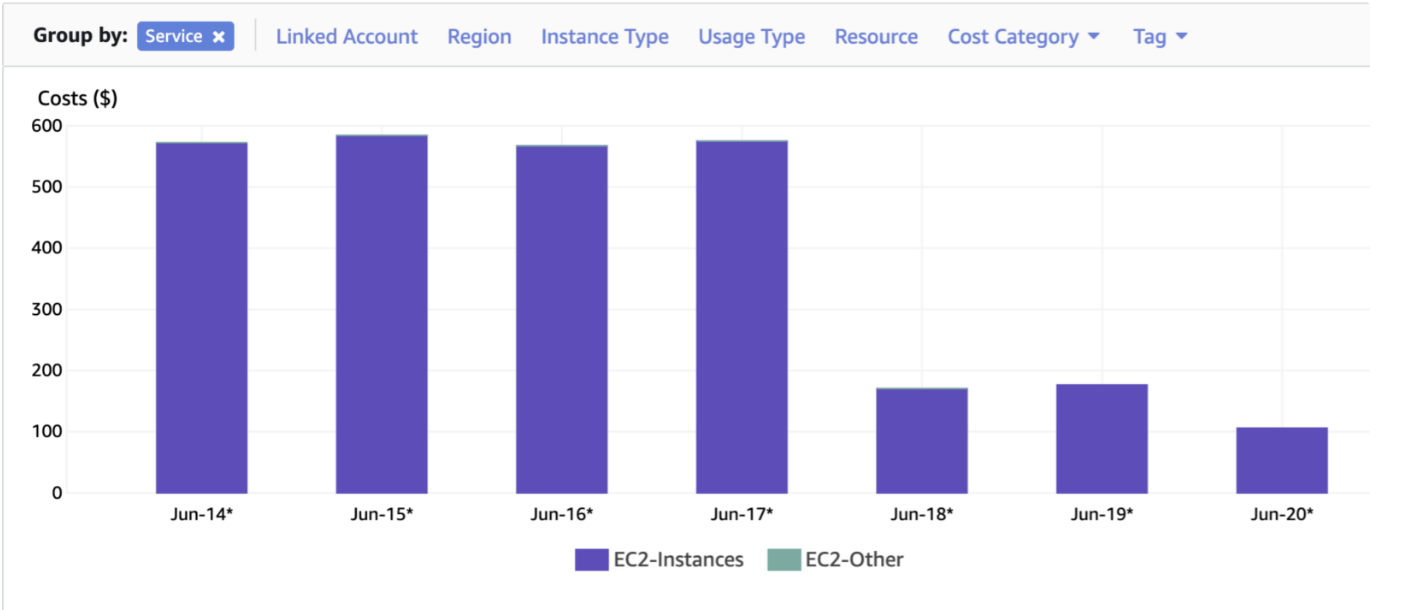
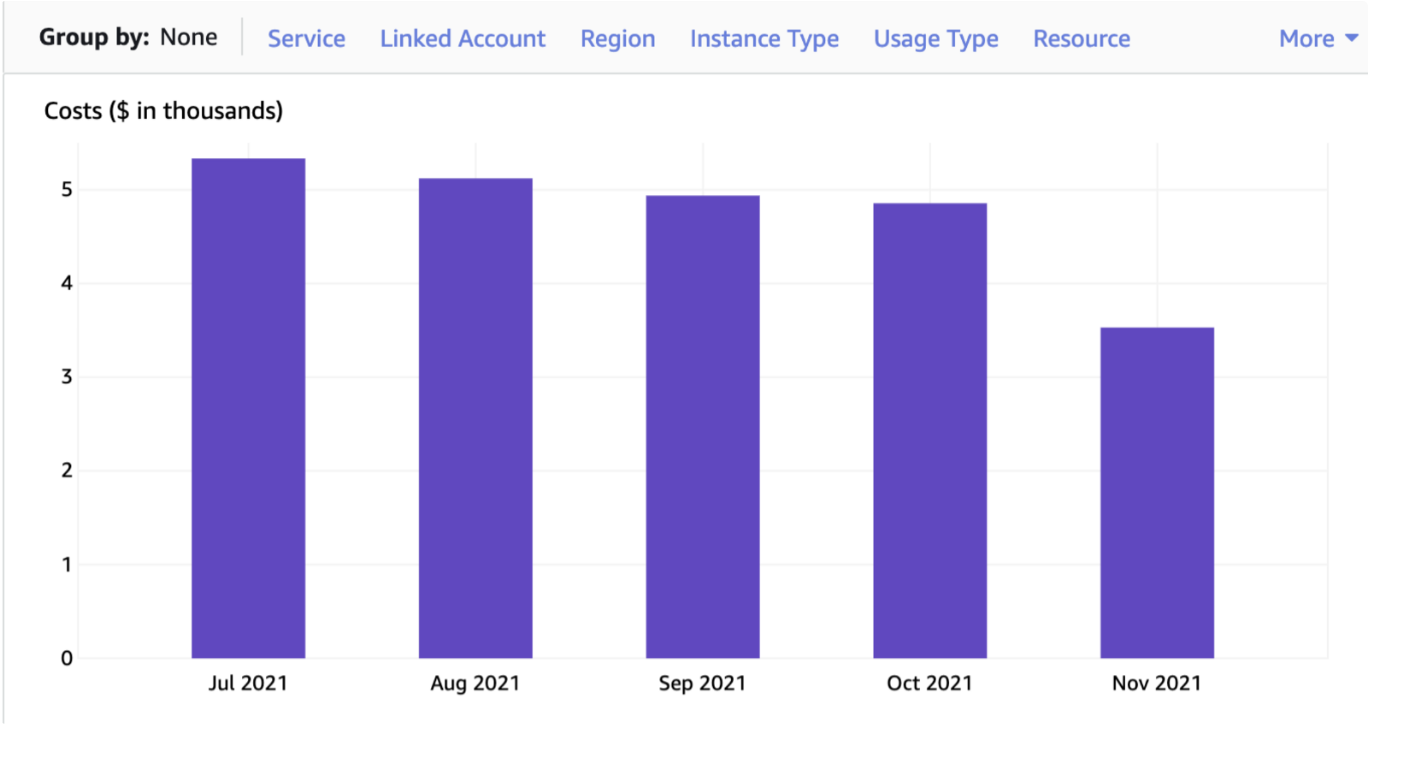
- Then we realised that we are using on-demand instances for the conversion and compression. So we took the decision to use AWS SPOT which provides up to a 90% discount compared to On-Demand prices. By just moving from on-demand to spot, we were able to reduce the daily bill by more than 60% as shown below
-
Moving to spot has its own challenges as spot can be terminated by AWS anytime. But AWS sends a graceful shutdown notification 2 minutes before the shutdown time. Upon receiving the notification we take proper steps to resume the service job in a different instance. This needs a dedicated blog on its own - how exactly do we operate these services - do keep an eye out for the same!
-
Now we were in an optimistic space where we thought we were not leaking any money. To the last step of optimisation, we dig down into the low-level code to reduce any task/job time. We knew that we can turn down our compute hours which will result in cost optimisation as it was a legacy service. So we did the following as shown in the diagram.
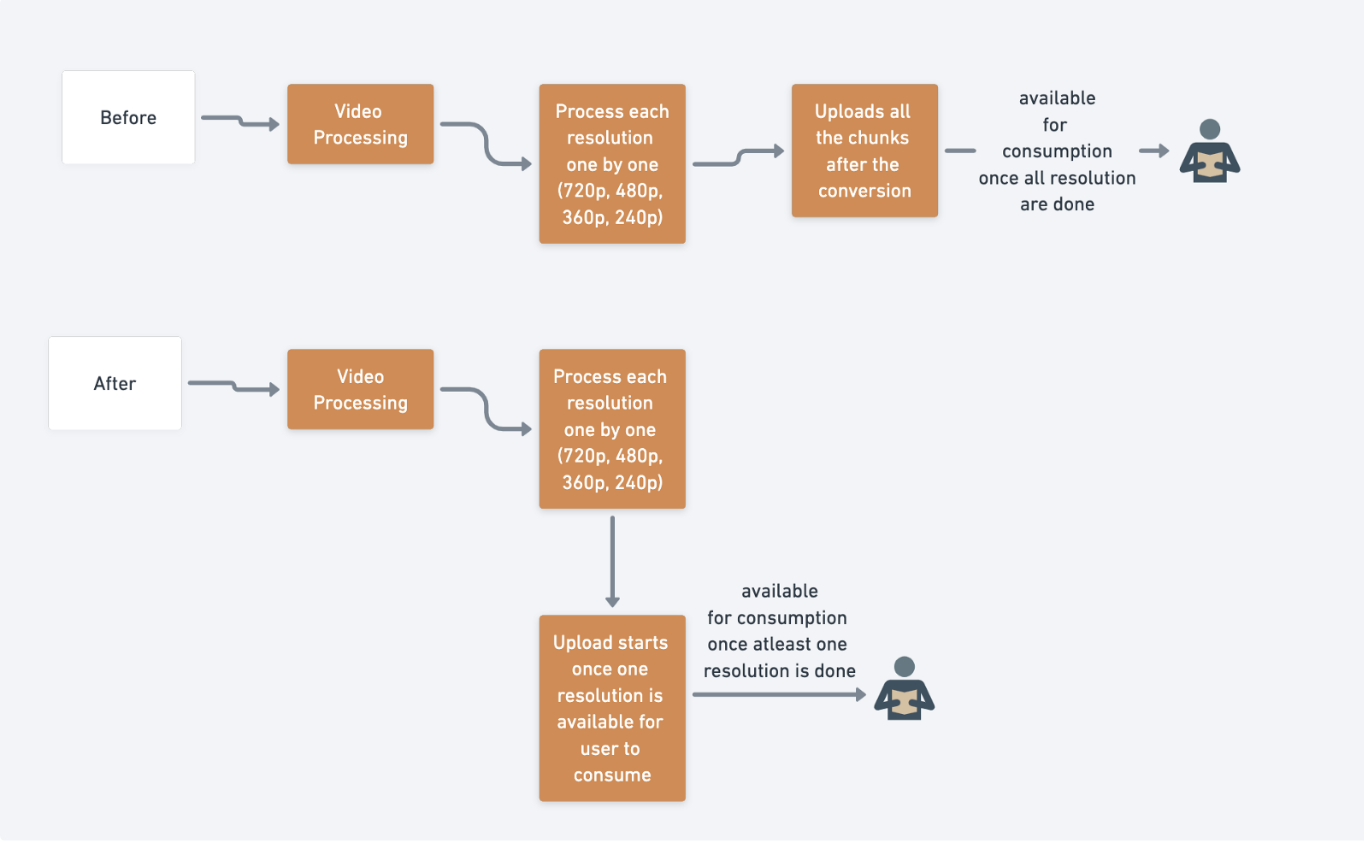
- As illustrated in the diagram, the user has to wait to consume a video until all the resolutions are available. Also as each processed chunk is an object, a network call will be made to upload s3 API for each chunk. Earlier while converting the video the service was busy on the processing. So we enhanced it to upload concurrently once chunks are available for consumption. This takes away the responsibility of sync upload after conversion is done. Then we rewrote the code to a new language with best practices resulting in ~33% of cost reduction with pure low-level code changes.
S3
- We store a lot of objects in S3 and the major cost is due to the storage we use. We have multiple use-cases for different objects. Identifying which object to put in hot expensive s3 class vs cold tiered storage made us dig deeper into the access patterns. With help of the business team, we set up an SLA for objects and intelligently put objects after a certain time to cold tier class like Amazon S3 Glacier storage class. Also, rules for deleting the objects permanently as well gave us a boost in reducing the cost.
⚠️
Before moving to glacier remember this, for each object archived to Amazon Glacier, Amazon S3 uses 8 KB of storage for the name of the object and other metadata. Amazon S3 stores this metadata so that you can get a real-time list of your archived objects by using the Amazon S3 API. You are charged standard Amazon S3 rates for this additional storage.
For each archived object, Amazon Glacier adds 32 KB of storage for index and related metadata. This extra data is necessary to identify and restore your object. Hence, if we store objects with a size less than 32KB, the total cost will be higher than simply storing the data in the Standard storage class.
EKS
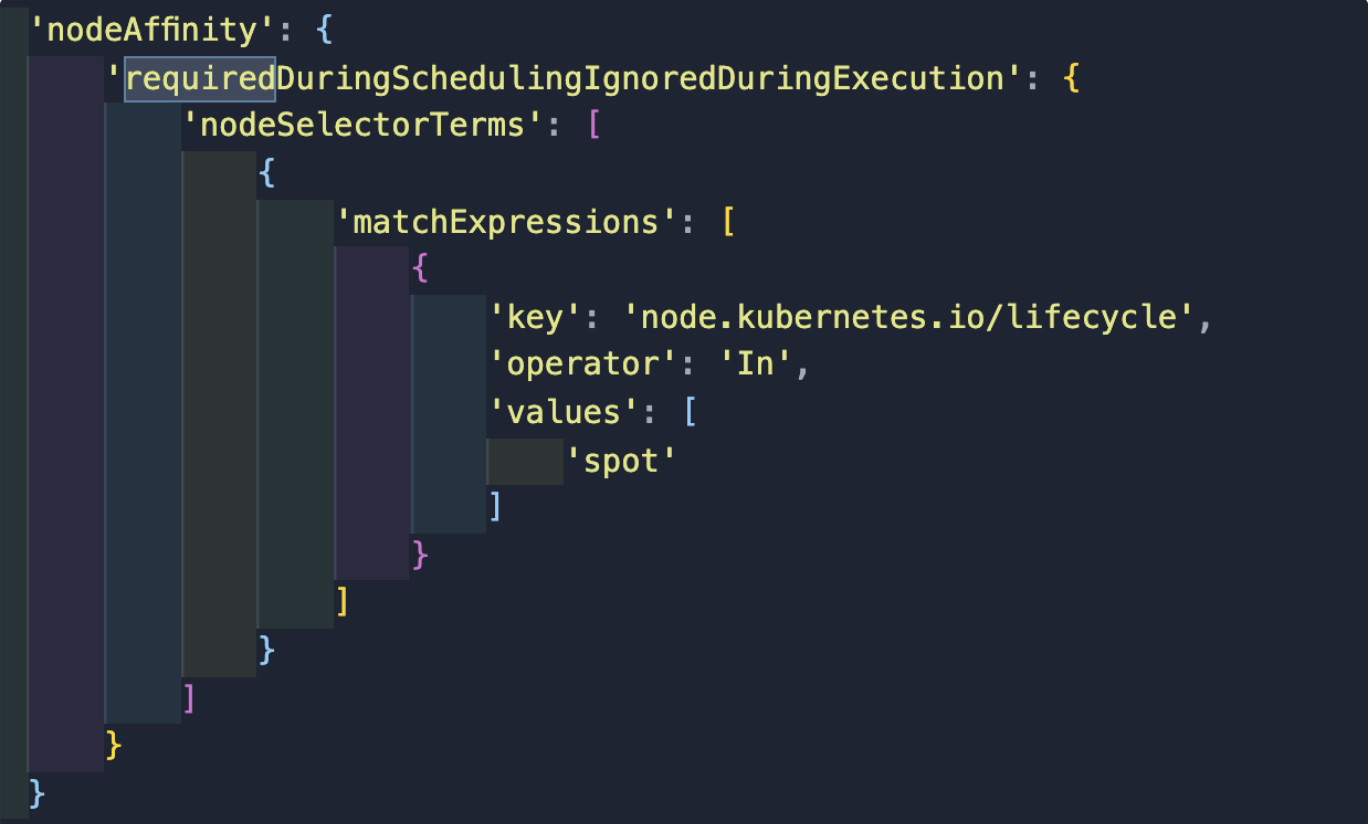
One of our services is backed by Amazon’s Managed Kubernetes Service. It launches more than 6k containers on EKS daily. It was initially backed by on-demand worker nodes. To reduce the cost of on-demand nodes we categorised our jobs into namespaces. Then we set the SLA and priority of jobs based on our internal business use-cases to specific namespaces. As we were launching the jobs from code itself, out of three namespaces, we moved two namespaces as their first preference to launch inside SPOT worker nodes. This result in great savings of up to 40% by adding nodeAffnity expressions as spot.
Elasticache AutoScaling
Amazon ElastiCache for Redis supports auto-scaling to automatically adjust capacity to maintain steady, predictable performance at the lowest possible cost. You can automatically scale your cluster horizontally by adding or removing shards or replica nodes. ElastiCache for Redis uses AWS Application Auto Scaling to manage scaling and Amazon CloudWatch metrics to determine when it is time to scale up or down.
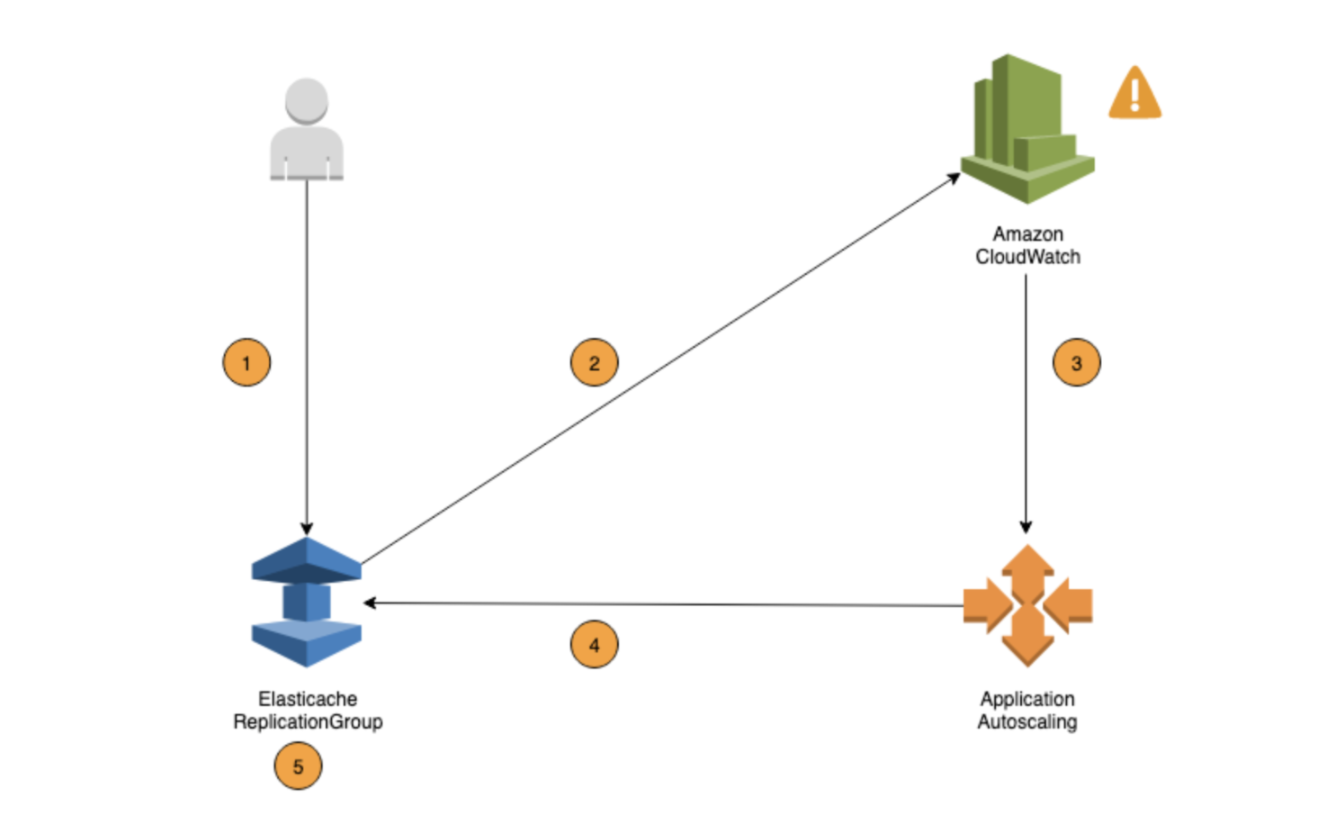
Previously, there was no autoscaling enabled in any of our elasticache services. That means we were not evaluating our resources whether we were underutilising/over utilising. Also unnecessary cost for unused resources. For the first version, we started with possible scheduled autoscaling based on the SLA and peak hours. Where we downscale when we don’t have the live traffic to deal with and upscale before the peak hours begin.
Then we also went for Target tracking scaling policies – Increase or decrease the number of shards/replicas that your service runs based on a target value for a specific metric (analyzing database memory utilization and Engine CPU). This is similar to the way that your thermostat maintains the temperature of your home. You select a temperature and the thermostat does the rest.
EndNote
I realised this is not going to be a one time exercise. In order to do it properly need to make it a regular routine and a best practice to understand the billing model of the cloud-native provider. We are continuously working on designing the architecture to ensure the cost is efficient. Also, we have more plans on auditing and optimising costs on other services used from our cloud-native platform.