Building a Parser: State Machines | RegExp
In our previous post, we implemented a basic tokenizer that handles numeric and string literals. Today, we’ll explore how our tokenizer’s implementation relates to finite state machines and how we can leverage regular expressions to create a more elegant and maintainable solution.
Understanding Finite State Machines
Before diving into the implementation, let’s take a moment to understand what finite state machines are and how they relate to our tokenizer.
A finite state machine (FSM) is a mathematical model of computation that describes an abstract machine that can be in exactly one of a finite number of states at any given time. The FSM can change from one state to another in response to some inputs; this is called a transition.
In the context of our tokenizer, each token type can be thought of as a state in our FSM. The input characters drive the transitions between these states.
Example: Number/String State Machine
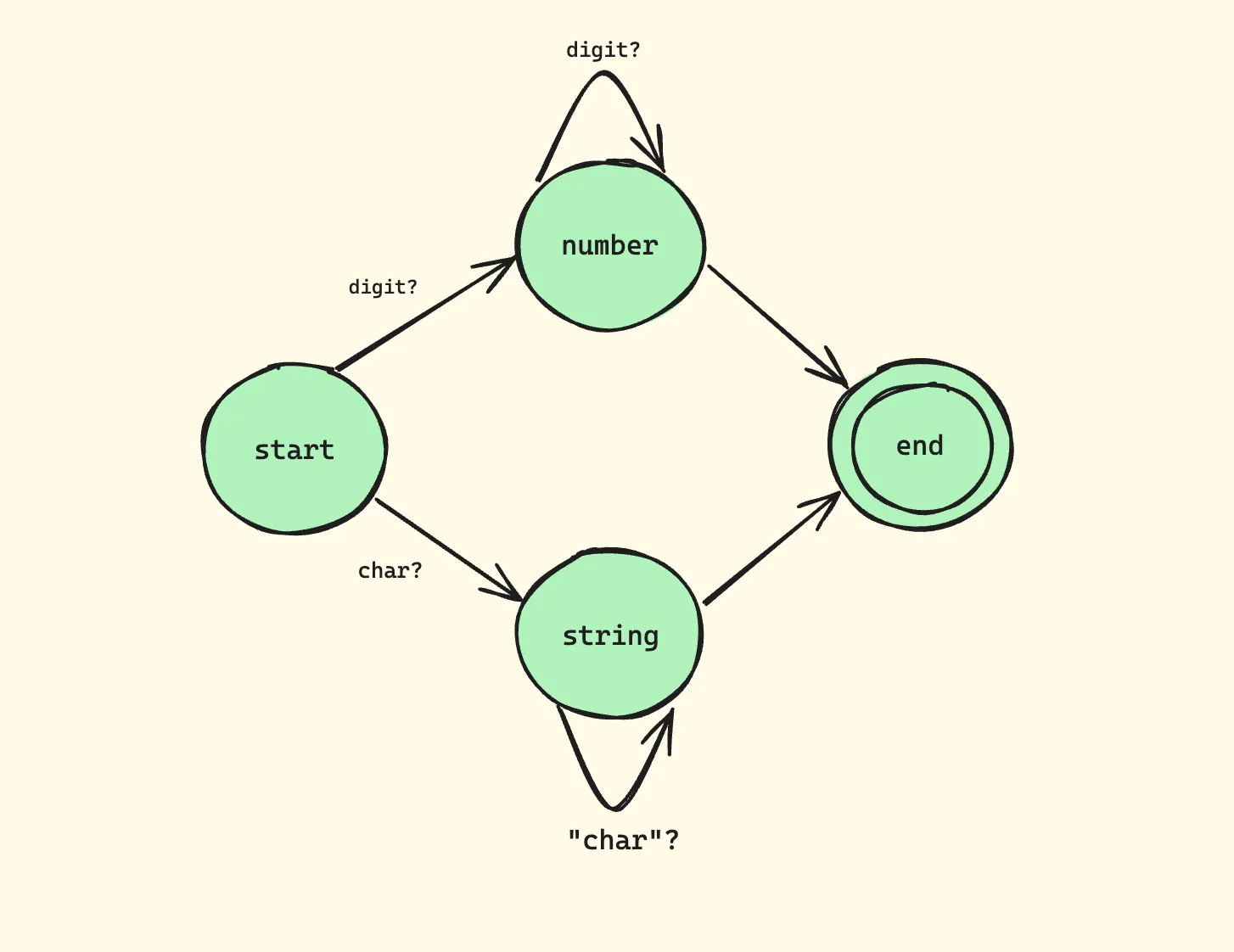
This diagram illustrates:
- We start in the START state
- Upon encountering a digit [0-9], we transition to the NUMBER state
- We stay in the NUMBER state as long as we keep seeing digits
- When we encounter a non-digit [^0-9], we transition to the END state
Our current tokenizer implementation essentially functions as this state machine. For example, when processing numbers, we:
- Enter the “number state” upon encountering a digit
- Stay in that state while consuming subsequent digits
- Exit the state when we encounter a non-digit character
This pattern of “a digit repeated one or more times” is precisely what regular expressions are designed to handle. The regular expression \d+ captures this exact behavior, making our code more concise and maintainable.
Regular Expressions: A Powerful Tool for Tokenization
Regular expressions (regex) are a sequence of characters that define a search pattern. They are incredibly powerful for text processing and pattern matching. In the context of our tokenizer, they allow us to define complex patterns succinctly.
Key Regex Concepts for Tokenization
-
Character Classes:
\d: Matches any digit (equivalent to [0-9])\s: Matches any whitespace character\w: Matches any word character (alphanumeric + underscore)
-
Quantifiers:
+: One or more occurrences*: Zero or more occurrences?: Zero or one occurrence
-
Anchors:
^: Start of the string$: End of the string
-
Groups and Capturing:
(): Groups expressions and creates a capture group(?:): Non-capturing group
-
Character Sets:
[...]: Matches any single character in the brackets[^...]: Matches any single character not in the brackets
Understanding these concepts will help you create more sophisticated token patterns.
Refactoring with Regular Expressions
Let’s refactor our tokenizer to use regular expressions. First, we’ll define a specification that maps patterns to token types:
class Tokenizer {
  /**
   * Specification of token patterns
   */
  spec = [
    // Numbers: sequence of digits
    [/^\d+/, 'NUMBER'],

    // Double quoted strings
    [/^"[^"]*"/, 'STRING'],

    // Single quoted strings
    [/^'[^']*'/, 'STRING'],

    // Whitespace: ignored
    [/^\s+/, null],

    // Single-line comments
    [/^\/\/.*/, null],

    // Multi-line comments
    [/^\/\*[\s\S]*?\*\//, null],
  ];

  init(string) {
    this._string = string;
    this._cursor = 0;
  }

  isEOF() {
    return this._cursor >= this._string.length;
  }

  hasMoreTokens() {
    return this._cursor < this._string.length;
  }

  /**
   * Obtains next token.
   */
  getNextToken() {
    if (!this.hasMoreTokens()) {
      return null;
    }

    const string = this._string.slice(this._cursor);

    for (const [regexp, tokenType] of this.spec) {
      const tokenValue = this._match(regexp, string);

      if (tokenValue == null) {
        continue;
      }

      // Skip comments and whitespace
      if (tokenType == null) {
        return this.getNextToken();
      }

      return {
        type: tokenType,
        value: tokenValue,
      };
    }

    throw new SyntaxError(`Unexpected token: "${string[0]}"`);
  }

  /**
   * Matches a token for a regular expression.
   */
  _match(regexp, string) {
    const matched = regexp.exec(string);
    if (matched === null) {
      return null;
    }
    this._cursor += matched[0].length;
    return matched[0];
  }
}
Understanding the Implementation
The Specification
The tokenizer specification is a list of pairs, each containing:
- A regular expression pattern
- The corresponding token type
spec = [
  [/^\d+/, 'NUMBER'],           // Numbers
  [/^"[^"]*"/, 'STRING'],       // Double-quoted strings
  [/^'[^']*'/, 'STRING'],       // Single-quoted strings
  [/^\s+/, null],               // Whitespace (ignored)
  [/^\/\/.*/, null],            // Single-line comments
  [/^\/\*[\s\S]*?\*\//, null],  // Multi-line comments
];
Let’s break down each pattern:
/^\d+/: Matches one or more digits at the start of the string/^"[^"]*"/: Matches a double-quoted string^": Start with a double quote[^"]*: Match any character that’s not a double quote, zero or more times": End with a double quote
/^'[^']*'/: Similar to the above, but for single-quoted strings/^\s+/: Matches one or more whitespace characters/^\/\/.*/: Matches single-line comments^\/\/: Start with two forward slashes.*: Match any character (except newline) zero or more times
/^\/\*[\s\S]*?\*\//: Matches multi-line comments^\/\*: Start with/*[\s\S]*?: Match any character (including newlines) zero or more times, non-greedily\*\/: End with*/
Pattern Matching
The _match method handles the core pattern matching:
- Tests if the pattern matches at the current position
- Updates the cursor position
- Returns the matched text
_match(regexp, string) {
  const matched = regexp.exec(string);
  if (matched === null) {
    return null;
  }
  this._cursor += matched[0].length;
  return matched[0];
}
This method uses regexp.exec(string) to attempt a match. If successful, it moves the cursor forward by the length of the matched text.
Token Generation
The getNextToken method:
- Tries each pattern in order
- Skips tokens with null type (whitespace/comments)
- Returns the first matching token
- Throws an error if no pattern matches
This method implements the core logic of our tokenizer:
getNextToken() {
  if (!this.hasMoreTokens()) {
    return null;
  }

  const string = this._string.slice(this._cursor);

  for (const [regexp, tokenType] of this.spec) {
    const tokenValue = this._match(regexp, string);

    if (tokenValue == null) {
      continue;
    }

    // Skip comments and whitespace
    if (tokenType == null) {
      return this.getNextToken();
    }

    return {
      type: tokenType,
      value: tokenValue,
    };
  }

  throw new SyntaxError(`Unexpected token: "${string[0]}"`);
}
This method iterates through the specification, attempting to match each pattern. When a match is found, it either skips it (for null token types) or returns a token object.
Testing the Implementation
Let’s test our enhanced tokenizer with various inputs:
const tokenizer = new Tokenizer();

// Numbers
tokenizer.init('42');
console.log(tokenizer.getNextToken());
// Output: { type: 'NUMBER', value: '42' }

// Strings with whitespace
tokenizer.init('"Hello, world!"   \'Another string\'');
console.log(tokenizer.getNextToken());
console.log(tokenizer.getNextToken());
// Output:
// { type: 'STRING', value: '"Hello, world!"' }
// { type: 'STRING', value: "'Another string'" }

// Comments
tokenizer.init(`
  42 // This is a number
  /* Multi-line
     comment */
  "Hello"
`);
console.log(tokenizer.getNextToken());
console.log(tokenizer.getNextToken());
// Output:
// { type: 'NUMBER', value: '42' }
// { type: 'STRING', value: '"Hello"' }
Exercise for Readers
To deepen your understanding and practice with regular expressions and tokenization, try extending the tokenizer to support:
- Hexadecimal numbers (e.g.,
0xFF) - Scientific notation (e.g.,
1.23e-4) - Template literals with backticks (e.g.,
`Hello, ${name}!`)
Here’s a hint for hexadecimal numbers:
// Add to spec:
[/^0x[0-9a-fA-F]+/, 'NUMBER']
For scientific notation, consider using a pattern like:
[/^\d+(\.\d+)?([eE][+-]?\d+)?/, 'NUMBER']
For template literals, you’ll need to handle interpolation. This is more complex and might require adjusting the tokenizer logic. Start with a simple version:
[/^`[^`]*`/, 'TEMPLATE_LITERAL']